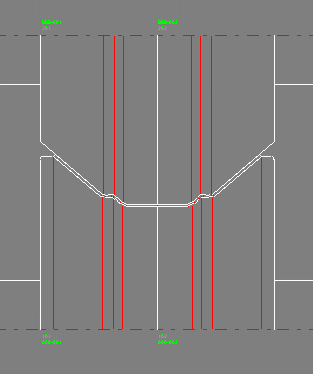
If the rolls should get the same contour as the profile, the automatic generation by scanning the profile is very useful. This method works for any kind of profile, folded too.
- Afterwards, the rolls can be modified by a set of powerful functions:
- conical extension, cylindrical extension, arched extension
- split at corner, split between corners, join
- turn, move, delete
- cut, copy, paste (to and from the clipboard)
- change width, diameter and fillet radius at each corner
by CAD design:
Otherwise, if you want to define the roll contour by yourself, the CAD design is recommended. Simply transfer the profile drawing to CAD and design the desired roll contour by modifying the profile contour. Afterwards transfer the roll contour back to PROFIL. The functions for modifying the rolls can be used, too.
by using rolls from the roll stock:
To re-use existing rolls from the roll stock, use the Roll Stock Management. More..
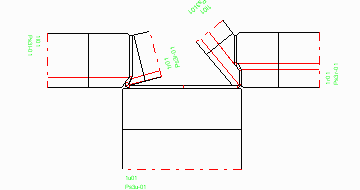
The automotive industry and also other applications require more and more complex roll formed profiles. In order to form such profiles on a roll forming machine, it often is necessary to have additional side axles with inclined angles that plunge into the open cross-section. This makes it easier to form the inner radii precisely. Technically, it is quite costly in terms of labour and time to adapt the machine and to mount special axle holders for each kind of profile individually. But this effort is unavoidable if high precision profiles are required.
PROFIL enables designing rolls for additional side axles with different inclinations angles.
More: Multi Axles Machine

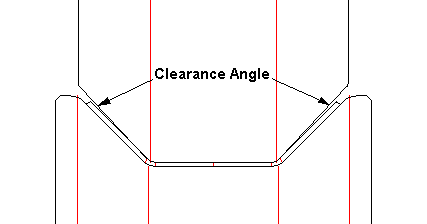
Clearance angle means, the inclined flank of a roll (top roll in the picture) is rotated by a small angle (normally 1-2 degree) around the roll corner point. Thereby an acute gap opens between roll and sheet. The more the circumferential speeds of top and bottom rolls differ, the larger is the gap width.
- What a clearance angle is required for?
There a two reasons why a clearance angle should be provided:- Balancing of different circumferential speeds in case of the roll diameter ratio does not fit to the gear transmission ratio.
- Avoiding wedging, thereby better "flowing" (transversal moving) of the profile legs into the stand.
More: Clearance Angle